As I booted up Cyberpunk 2077 on my rig in 2026, a wave of nostalgia hit me. This was the game that launched me into Night City years ago, and it's astonishing to see how it's evolved. CD Projekt Red's commitment has truly paid off, transforming it into the definitive immersive sim experience. Even now, well past its fourth anniversary, the game is receiving meaningful updates. The latest one, which I was eager to try, finally brings the much-anticipated AMD FSR 3 and Frame Generation technology to the neon-drenched streets, promising a significant performance boost for players like me with AMD graphics cards. After years of hearing about path tracing and DLSS 3, it felt great to have these cutting-edge upscaling and frame-boosting features available for my hardware.
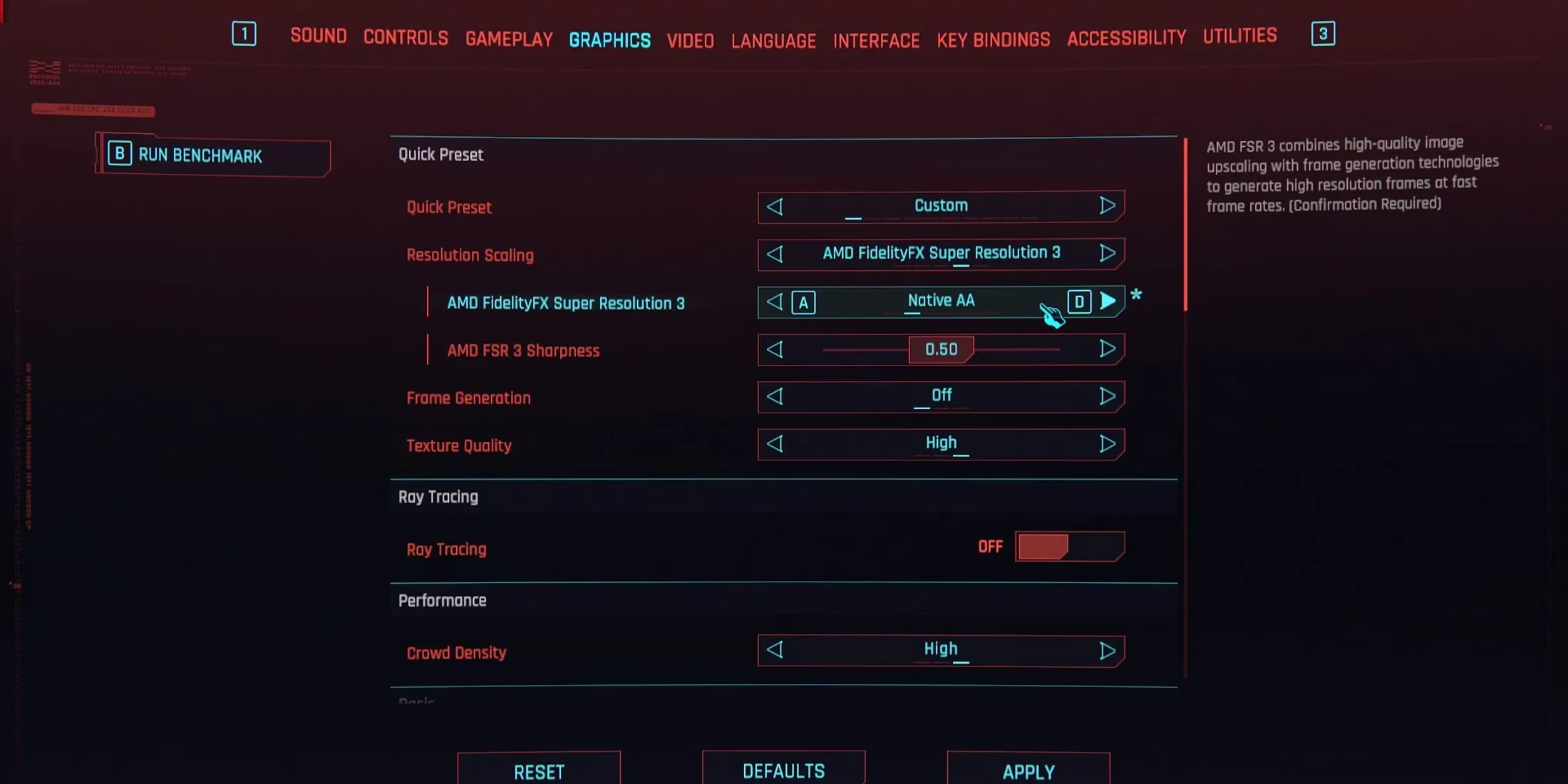
Getting FSR 3 up and running was a breeze. The game offers both FSR 2 and the newer FSR 3, giving you a choice, but I immediately went for the latest iteration. Here’s the exact path I followed to enable it:
-
Open the Settings Menu from the main or pause menu.
-
Navigate to the Graphics tab, which is the fourth one from the left.
-
Find the Resolution Scaling option and change it to AMD FidelityFX Super Resolution 3.
-
Set the AMD FidelityFX Super Resolution 3 quality preset. I play at 1440p, so I chose the Balanced mode for the perfect mix of visual fidelity and performance. If you're playing at 1080p, you might opt for Quality.
-
Finally, I tweaked the AMD FSR 3 Sharpness slider to my personal taste, adding a bit more clarity to the detailed cityscapes.
And that was it! Jumping back into the game, the difference was immediately noticeable. The framerate was smoother, making the high-speed chases through the Badlands and the dense crowds of the city center feel incredibly fluid. For purists who don't want any resolution upscaling but still want the superior anti-aliasing of FSR 3, there's a clever option: simply set the AMD FSR 3 setting to Native AA. It's a testament to the flexibility CD Projekt Red has built into this system.
But I wasn't done yet. I wanted to push my performance even further, and that's where Frame Generation comes in. This tech is a game-changer, artificially generating intermediate frames to make gameplay buttery smooth. The setting is conveniently located right below the Resolution Scaling option in the menu. A crucial detail to remember: enabling Frame Generation automatically forces the use of FSR 3 for upscaling; you can't pair it with other upscalers like the in-game DLSS.
However, Frame Generation isn't a magic "enable and forget" switch. To get the best experience and avoid potential visual hiccups, there are a few important prerequisites and best practices I had to check:
| Consideration | Why It Matters | My Setup Check ✅ |
|---|---|---|
| High Refresh Rate Monitor | The developer recommends at least a 120Hz display to avoid frame time issues. | My 165Hz monitor was perfect for the job. |
| Solid Baseline FPS | You should have at least 60 FPS before enabling Frame Gen to prevent visual artifacts. | My rig was hitting a steady 70-75 FPS in demanding areas, so I was good to go. |
| Hardware-Accelerated GPU Scheduling (HAGS) | This Windows feature must be enabled for Frame Gen to work. | This required a quick system check. |
Enabling HAGS was the only slight detour. On Windows 11, it's usually on by default, but I double-checked. Here’s how you can enable it if needed:
-
Press the Windows key and type "Graphics Settings".
-
Open the result and toggle "Hardware-Accelerated GPU Scheduling" to On.
-
You'll need to restart your PC for the change to take effect. It's a simple one-time setup that unlocks a world of smoother performance.
Before diving in, I made one final, crucial step: updating my GPU drivers to the latest 2026 version. Running outdated drivers with new features like this is asking for trouble, whether it's stability problems or missing out on optimizations. With everything set—HAGS enabled, drivers updated, and the settings dialed in—I launched back into the game. The transformation was spectacular. Exploring the glittering skyscrapers of Corpo Plaza or the rain-slicked alleyways of Japantown felt like a completely new experience. The fluidity added by Frame Generation, on top of the efficiency of FSR 3 upscaling, made Night City feel more alive and responsive than ever before. It's incredible to think that years after its release, Cyberpunk 2077 isn't just being patched; it's being genuinely enhanced with the latest tech, proving that in the world of gaming, some stories—and performances—only get better with age. 🚀